
In a rapidly evolving data ecosystem, Apache Iceberg stands out as a future-proof technology that simplifies complex data management tasks, dramatically improves performance, and integrates seamlessly with modern cloud infrastructures. With growing adoption by industry leaders such as Netflix, Apple, and Adobe, understanding Iceberg isn’t just advantageous—it’s becoming essential for any forward-thinking data professional.
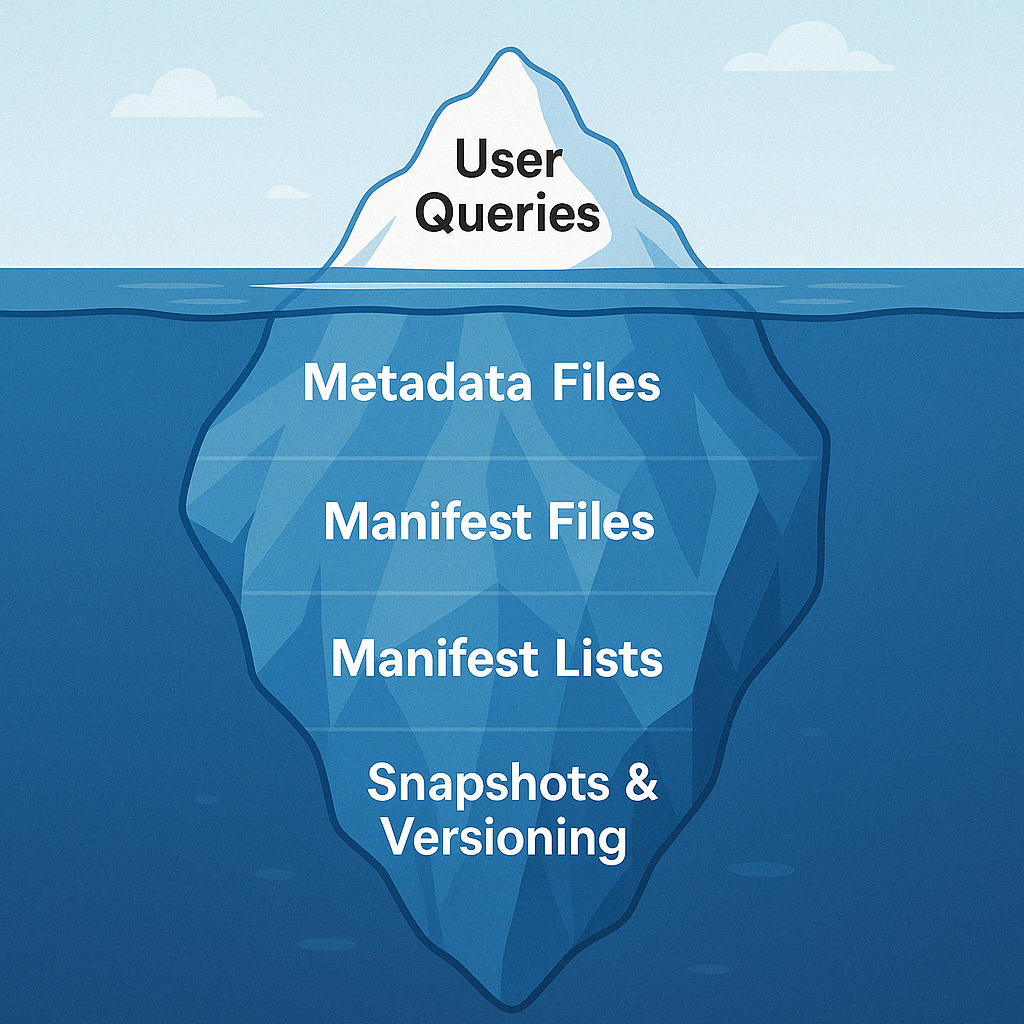
1. First Things First: What is Apache Iceberg?
Iceberg 101: Not Your Regular Data Format
Imagine a library that magically organizes itself—books get shelved automatically, the index updates itself, and lost items are a thing of the past. Apache Iceberg does something similar, turning chaotic data storage into a highly efficient, organized paradise.
Why Do You Need Apache Iceberg?
Think of Iceberg as Google Maps for your data: instead of wandering aimlessly through complex storage structures, you get direct, pinpoint navigation to your data files. Say goodbye to slow queries and messy data structures.
2. What Exactly Is an Iceberg Table?
Think of an Iceberg table as more than just rows and columns—it’s an intelligent structure that knows how to evolve, scale, and perform like a pro.
Here’s what makes it tick:
Schema Evolution
You can add, drop, rename columns without breaking your applications. It’s like remodeling your kitchen while still cooking dinner!
Partitioning Without the Pain
Iceberg supports hidden partitioning—no need to manually manage folder structures. It’s like asking your smart assistant to organize your closet by season without you lifting a finger.
Table Metadata
Every table has a metadata file (JSON) that stores its schema, partition spec, properties, and the location of the latest snapshot. Think of it as the table’s control room.
Manifest List & Manifests
The manifest list points to multiple manifest files. Each manifest file keeps track of data files and their partition stats. Together, they tell you exactly where the data lives—like a table of contents and an index combined.
In short, an Iceberg table is a self-aware, self-managing data structure that makes big data feel simple.
3. How Apache Iceberg Manages Data Internally: A Complete Working Example
✅ From first insert → to updates → to deletes → to querying snapshots.
✅ Includes every file created and explains its purpose.
📦 1: Insert Records
We start with a simple insert of 10 records into an empty Iceberg table.
🔹 Inserted Records:
| ID | Name | Age | City |
|---|---|---|---|
| 1 | Alice | 25 | Mumbai |
| 2 | Bob | 30 | Delhi |
| 3 | Charlie | 28 | Bangalore |
| 4 | David | 35 | Chennai |
| 5 | Eva | 40 | Kolkata |
| 6 | Farah | 22 | Pune |
| 7 | George | 29 | Jaipur |
| 8 | Hannah | 31 | Kochi |
| 9 | Ivan | 27 | Surat |
| 10 | John | 33 | Noida |
🧠 What Iceberg Does Behind the Scenes:
| File Type | File Name | Description |
|---|---|---|
| Data File | data-file-1.parquet | Holds all 10 records in columnar format |
| Manifest File | manifest-1.avro | Tracks this newly added data file |
| Manifest List | manifest-list-1.avro | Points to the manifest file |
| Metadata File | metadata-v1.json | Records the table state at this point — Snapshot 1 |
Tracked via metadata chain like so:
📸 Snapshot 1 (metadata-v1.json)
Iceberg now has:
metadata-v1.json
⬇️
manifest-list-1.avro
⬇️
manifest-1.avro
⬇️
data-file-1.parquet
Everything is clean. Easy!
🔁 2: Update Operation
Bob and Eva celebrate their birthdays 🥳 → They age by +1 year.
🔄 Records Updated:
- ID 2: Bob → Age 31
- ID 5: Eva → Age 41
🧠 What Iceberg Does:
Iceberg does not modify data-file-1. It uses “copy-on-write”.
| File Type | File Name | Description |
|---|---|---|
| Data File | ➕ data-file-2.parquet | Contains updated Bob (ID 2) and Eva (ID 5) |
| Delete File | ➕ delete-file-1.avro | Equality delete → marks ID 2 & 5 as deleted from data-file-1 |
| Manifest File | ➕ manifest-2.avro | Tracks new data file and delete file |
| Manifest List | ➕ manifest-list-2.avro | Points to both manifest-1 and manifest-2 |
| Metadata File | ➕ metadata-v2.json | Snapshot 2 |
🧾 Snapshot 2 Summary
After Update of Bob and Eva:
data-file-1.parquetremains untouched (still has old Bob and Eva).- Iceberg writes:
data-file-2.parquet→ with updated Bob & Eva- Delete File (e.g.,
delete-file-1.avro) → stating:- equality delete:
ID=2,ID=5
- equality delete:
- Manifest gets updated to include this delete file.
- Query engine reads the manifests and sees:
- For
data-file-1.parquet, skip rows with matchingID=2,ID=5 - For
data-file-2.parquet, read everything
- For
👉 So at read time, it never actually loads or returns the stale rows.
❌ 3: Delete Operation
❌ Deleted Records:
- ID 3: Charlie
- ID 9: Ivan
🧠 What Iceberg Does:
| File Type | File Name | Description |
|---|---|---|
| Delete File | ➕ delete-file-2.avro | Equality delete → marks ID 3 & 9 (Charlie, Ivan) |
| Manifest File | | Tracks the delete |
| Manifest List | ➕ manifest-list-3.avro | Includes all manifests from snapshot 1–3 |
| Metadata File | ➕ metadata-v3.json | Snapshot 3 |
📸 Snapshot 3 Summary
After Delete in Step 3:
data-file-1.parquetremains untouched (still has Charlie and Ivan inside).- Previously written
data-file-2.parquet(Bob & Eva updated) remains unchanged.
Iceberg writes:
delete-file-2.avro→ an equality delete file specifying:ID=3(Charlie)ID=9(Ivan)
Manifest gets updated to include:
- The new delete file (
delete-file-2) - This is recorded in
manifest-3.avro
Query engine reads manifests and sees:
- For
data-file-1.parquet:- Skip rows with
ID=2,ID=5(from previous delete) - Skip rows with
ID=3,ID=9(from this step)
- Skip rows with
- For
data-file-2.parquet:- ✅ Read everything (updated Bob & Eva)
✅ Efficiently handled with only small delete files — no full rewrite!
4. The Secret Sauce: How Iceberg Achieves Performance
When people hear “table format”, they don’t always think blazing fast — but Apache Iceberg flips that assumption.
🚫 Avoiding Full File Scans: Metadata Indexing Magic
Traditional file-based systems (like Hive on HDFS) require scanning entire folders of files — even just to answer a simple query.
Iceberg flips the game by:
- Storing rich metadata about every file (row count, min/max column values, partitions).
- Using manifest files and partition specs to prune irrelevant files before touching them.
- Supporting column-level stats for pushdown filtering — skip files that can’t possibly match the filter.
This means:
✅ Less I/O
✅ Smaller query footprint
✅ Faster reads
5. Schema Evolution and Data Integrity
Modern data doesn’t stay the same — new fields, renamed columns, or deprecated attributes are inevitable.
Iceberg handles it like a pro.
✅ Schema Evolution = Easy
You can:
- Add columns → No rewrite needed, backward-compatible
- Drop columns → Future queries skip them
- Rename columns → Reflected in metadata; file compatibility maintained
💡 Behind the scenes, Iceberg tracks field IDs — so even if the name changes, the system knows what’s what.
💡 Why This Matters for BI & Analytics
- Tools like Power BI, Tableau, or Looker won’t break when columns evolve
- Your data pipelines don’t need a full reload on schema change
- It supports safe schema evolution across versions and snapshots
6. The Future of Apache Iceberg
The Iceberg community is just getting warmed up. The roadmap is ambitious and exciting.
🔮 What’s may come in future
- Native Row-level Security (RLS) and fine-grained access control
- Improved support for streaming updates
- Optimized compaction strategies with ML-based triggers
- Cross-table transactions (multi-table commit/rollback)
- Enhanced integration with open-source engines and cloud warehouses
🧊 Why You’ll Love Iceberg
- It’s the data format that grows with your platform
- Plays well with any engine, any cloud
- Built for analytics at scale
- Built for the future of data engineering
7. Final Thoughts
Apache Iceberg isn’t just another format — it’s an architectural foundation.
It solves real, painful problems:
- File explosion
- Broken schema changes
- Slow queries at scale
- Vendor lock-in
It brings you:
- Flexibility
- Performance
- Simplicity
🔥 Whether you’re building a modern lakehouse or just want versioned data with less pain — Iceberg is your new best friend.